
XL330-M288-T 是一款紧凑型智能伺服电机,适用于机器人关节和精密控制。核心特点高扭矩输出:堵转扭矩最高达 0.6 N·m(6 V),齿轮比为 288.4:1,适合高负载场景。轻量化设计:重量仅 18 g,尺寸为 20 × 34 × 26 mm,适合空间受限的应用。多种控制模式:支持位置、速度、电流和 PWM 控制,并支持扩展位置控制模式,范围可达 ±256 圈。高精度传感:配备 12 位无接触式绝对编码器,分辨率为 4096 脉冲/转。通信灵活:采用 TTL 串口通...
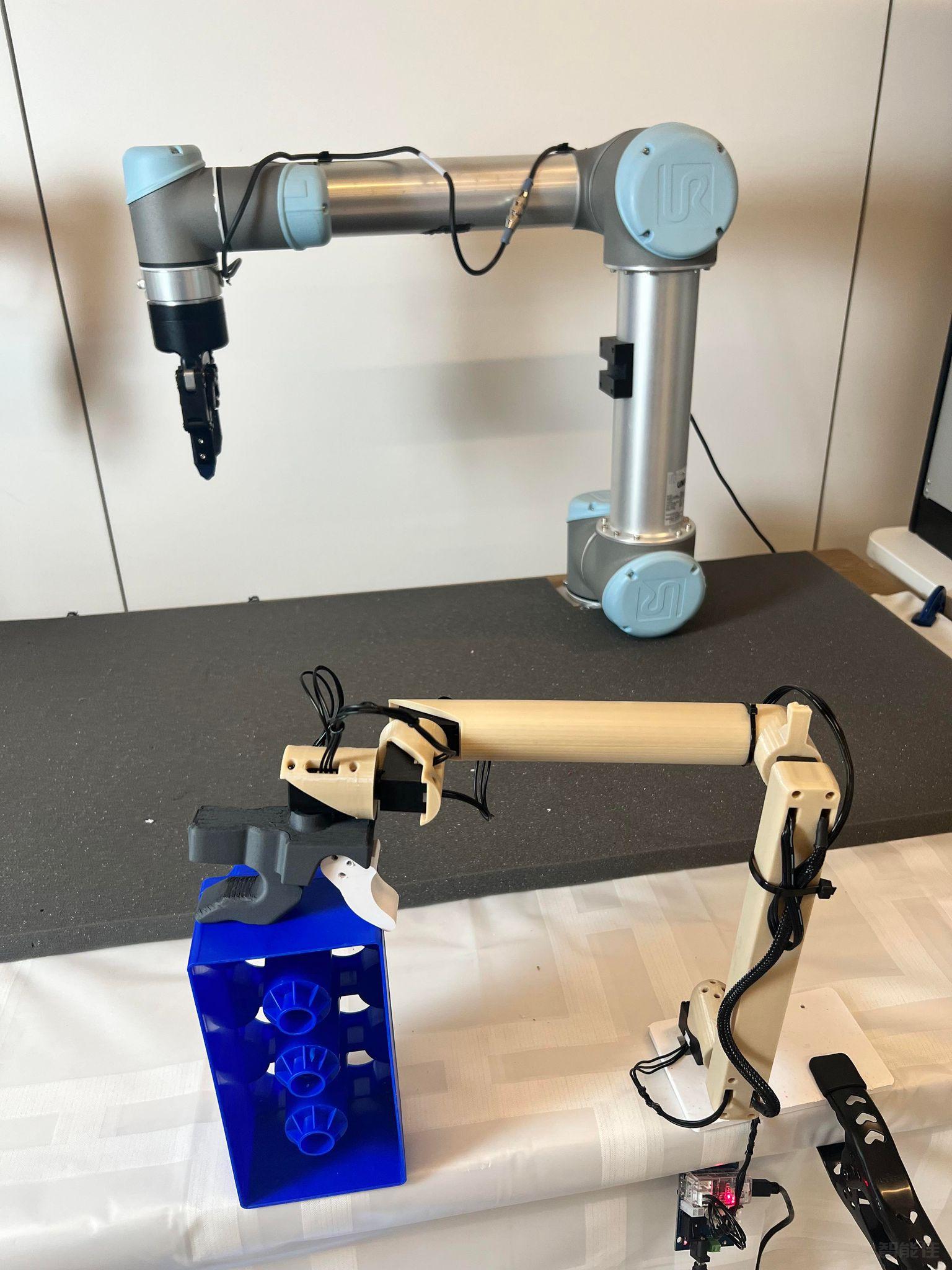
智能佳—Gello-UR机械臂遥操作—操作引导视频/* 仅针对本页面的局部样式,不影响全局 */
.product-video-container {
max-width: 100%;
margin: 20px 0;
background: #fff;
border-radius: 4px;
overflow: hidden;...

点击跳转项目地址:https://wuphilipp.github.io/gello_site/代码地址:https://github.com/wuphilipp/gello_software...
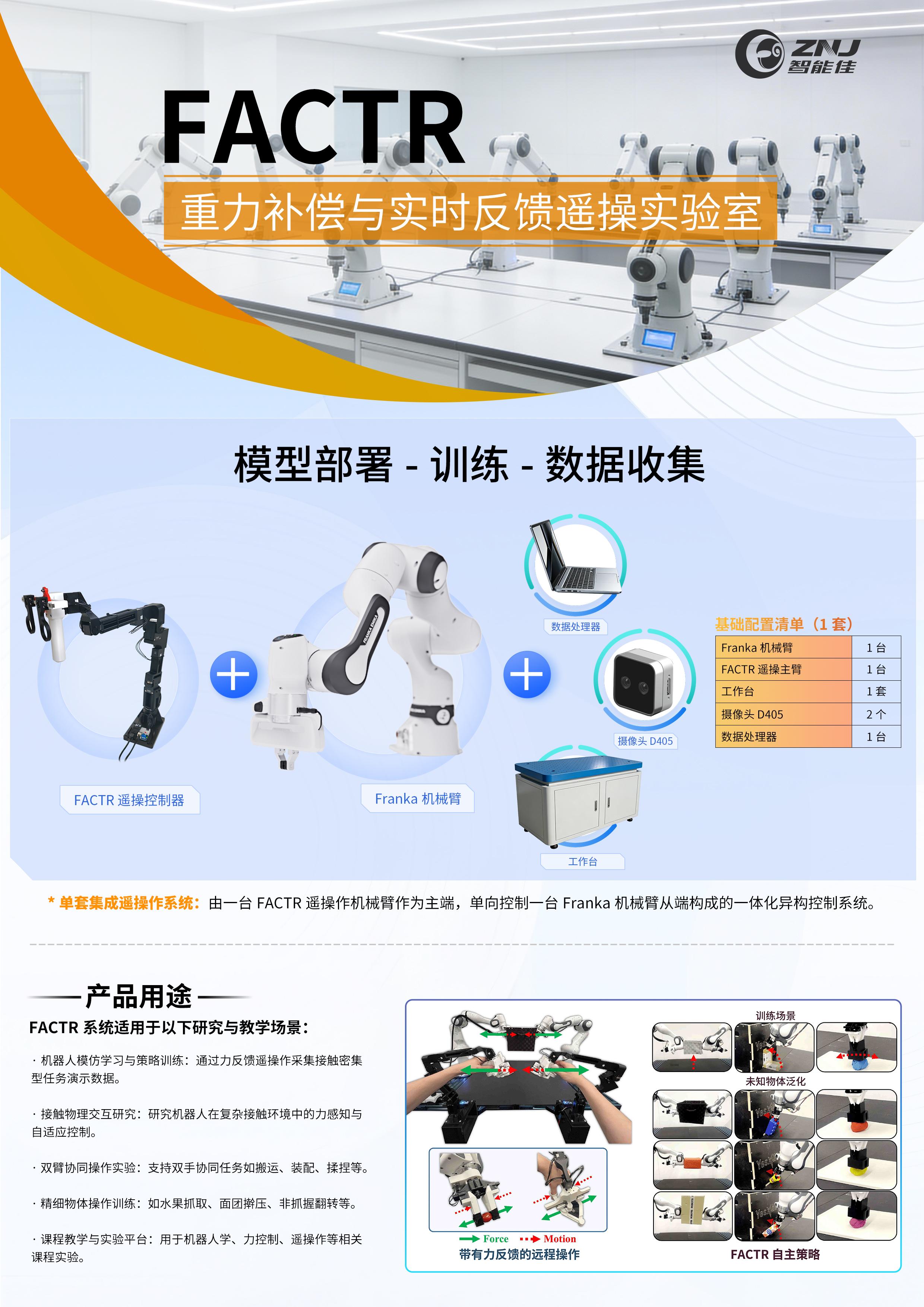
采购点击跳转:项目网站:https://jasonjzliu.com/factr/代码开源地址:https://github.com/JasonJZLiu/FACTR_Teleop...

Microduck原装热门舵机XL330-M288-T介绍 咨询采购手搓microduck保姆级完整教程!一步一步带你从零开始做鸭,小白也能复刻! document.getElementById("spkj").style.height=document.getElementById("spkj").scrollWidth*0.76+"px";Microduck官方网站AI-FanGe复刻教程fanhao375复刻教程JoyandAI复刻教程关于仿真...
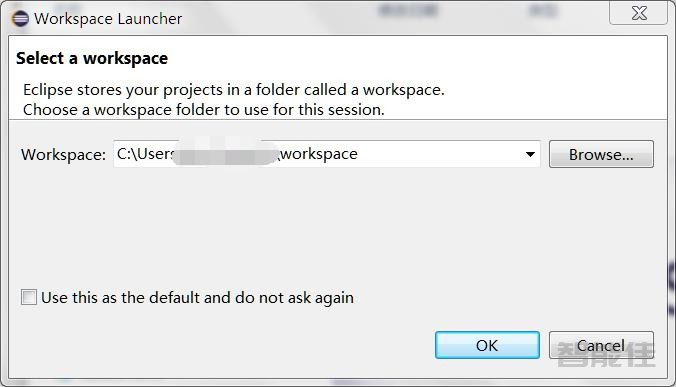
双击打开 Eclipse 并选择一个工作区。点击 File > New > C Project。在对话框中,为您的项目命名(此处为Kilobot),然后在下 Project Type 选择 AVR Cross Target Application > Empty Project。点击 Next。 取消 Debug 选项。在下一个对话框(AVR Target Hardware Properties)中,在 MCU Type 选项下选择 ATmega3...
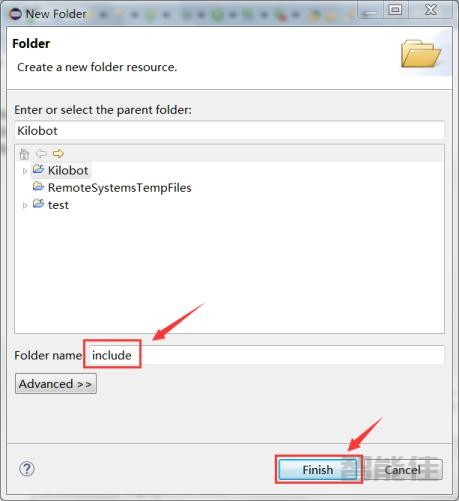
在没有设置库和头文件的路径的情况下,会报错或者警告。在您的 Eclipse项目中,创建两个新目录并分别调用include和lib(要创建一个新目录,请在项目名称上单击鼠标右键> New>Folder)。新建include。 新建lib。新建完毕之后,如图所示:将Kilobot2.0目录下Include目录下所有.h 文件复制到include项目中的目录中。将libkilolib.a文件从Kilobot2.0目录下/Lib目录下复制到lib新目录中。最终如...
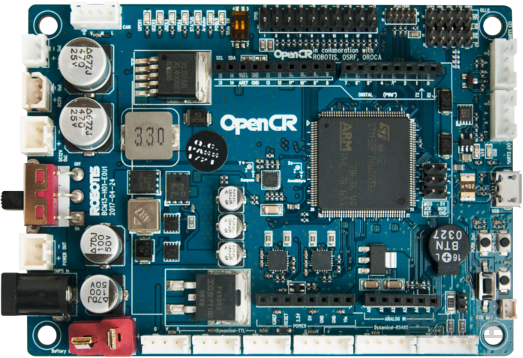
简单介绍openCR板的背景和规格。OpenCR1.0是为ROS嵌入式系统开发的,可提供完全开源的硬件和软件,该板的一切,包括TurtleBot3和OP3的原理图,PCB Gerber,BOM以及固件源代码已根据开源许可证免费为用户和ROS社区提供。OpenCR1.0板上的STM32F7系列芯片基于具有浮点单元的功能非常强大的ARM Cortex-M7。OpenCR1.0的开发环境从Arduino IDE和Scratch(面向年轻学生)到专家的传统固件开发,已广泛开放。Ite...
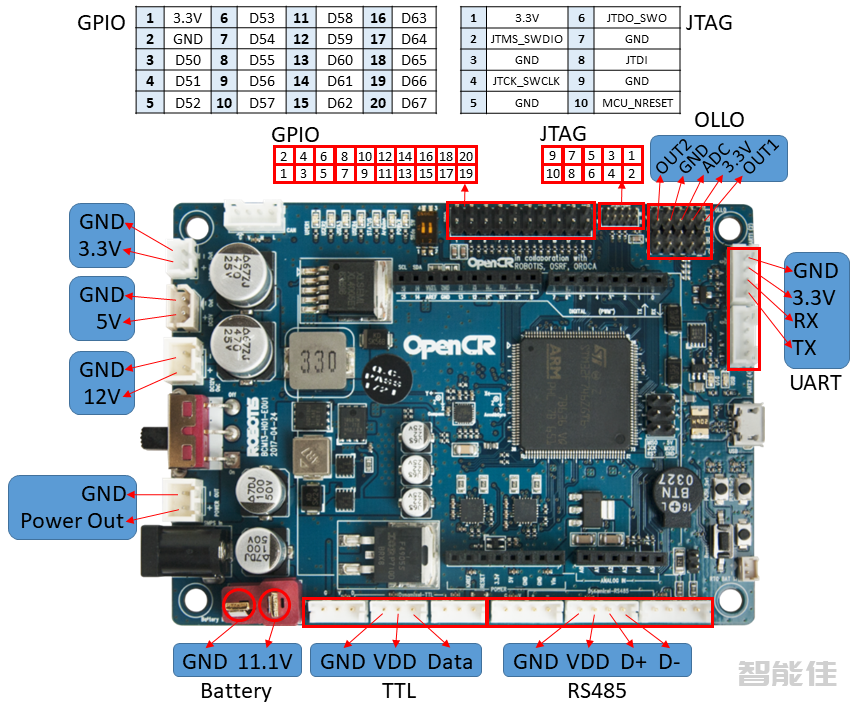
警告:为提高用户安全并防止专有风险或损坏,请务必检查安装在 DYNAMIXEL和电路板上的引脚排列。DYNAMIXEL的 Pinout可能因连接器制造商而异。...
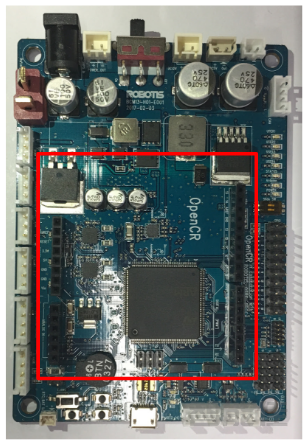
OpenCR包括一个与Arduino Uno pinmap兼容的连接器。引脚0到21与 Arduino Uno是相同的引脚,此后它们映射到添加到OpenCR的引脚。...
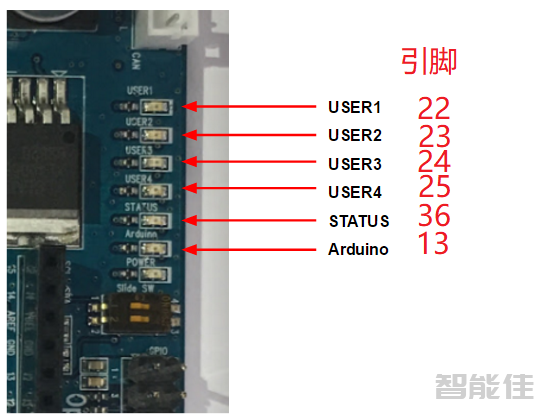
用户指示灯OpenCR 附加LED由四个LED 组成,并映射到Arduino引脚22-25。拨码开关5针连接器按钮开关...
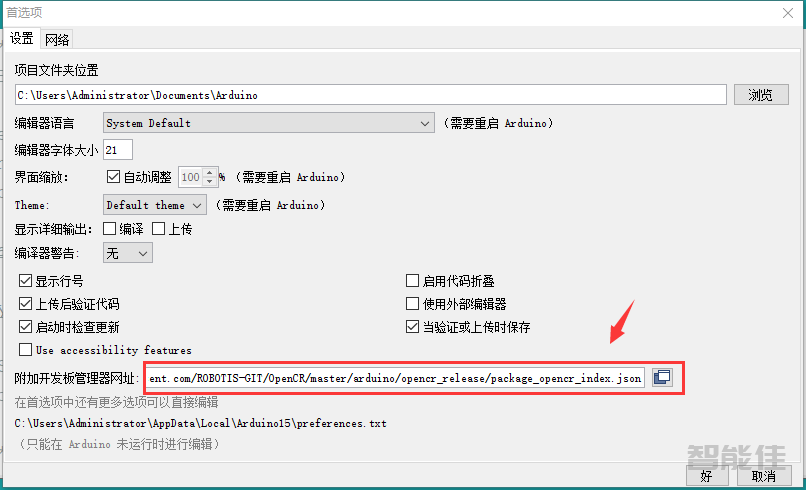
安装驱动对于 Windows 10 PC,将自动安装适当的驱动程序。安装Arduino IDE从arduino官方主页下载最新版本的Arduino IDE,并安装。目前,OpenCR将在1.8.0或更高版本上线。端口对应到Arduino IDE首选项Arduino IDE运行后,点击IDE顶部菜单中的File(文件)→ Preferences(首选项)。当首选项窗口出现时,将以下链接复制并粘贴到附加开发板管理器 网址文本框。https://raw.githubusercont...
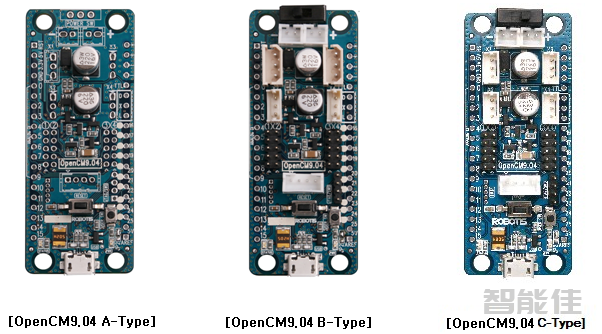
注意:OpenCM9.04控制板分为3个版本(如下图所示),3个版本的底板都是一样的,接口连接件不一样,现在B版已经停产;A版没有端子连接件等配件,需要另行选配;C版使用了适用于XL-320舵机的连接件,主要为XL-320舵机使用,当然,也可以用于其他舵机,但需要另外选配接口转接线。有3种版本可用:A版、B版和C版。A版、B版和C版之间的区别在于连接器不一样。...
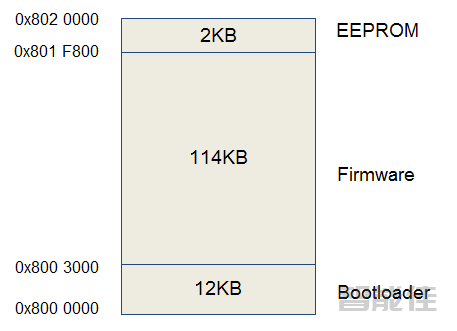
内存映射硬件架构OpenCM9.04的框架图如下所示。OpenCM9.04的原理图基于32位Cortex-M3核心STM32F103CB微控制器。电源原理图设计为通过5V和3.3调节器级联。5V电压提供给TTL总线,3.3V电压提供给微控制器、5针端口和4针通信端口。OpenCM9.04支持USB2.0 Micro-B连接器用于下载程序或执行数据通信。注意:引脚11(TX1)和引脚12(RX1)不能同时使用,因为引脚11和引脚12属于USART通道1,而该通道已分配给Dyna...
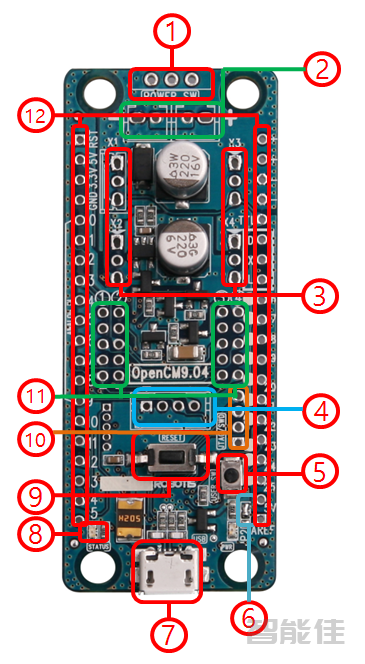
①电源开关用于控制电路板的电源和DYNAMIXEL电源的开关。注意:连接USB电缆时,电路板始终通电。②串行电池插座连接两节LBS-04锂电池。(适用于XL-320舵机供电,当然,用其他符合舵机电压标准的电源也是可以的)警告:当电池连接到电路板时,不要给电池充电,会导致短路。在给电池充电时,务必断开与电路板的连接。③DYNAMIXEL TTL 3 PIN管脚用于3pin TTL接口的舵机(DYNAMIXEL TTL 总线)。④通信接口外围设备使用有线/无线的方式进行通信 (比...